Anycubic Kobra S1 Combo First Look: The Real Cost of Color
Early impressions from the first prints. A fast, easy-to-set-up enclosed CoreXY printer with clean color changes, but multicolor prints cost you hours of swap time and far more purge than plastic in the part.
Check price at AnycubicOn this page
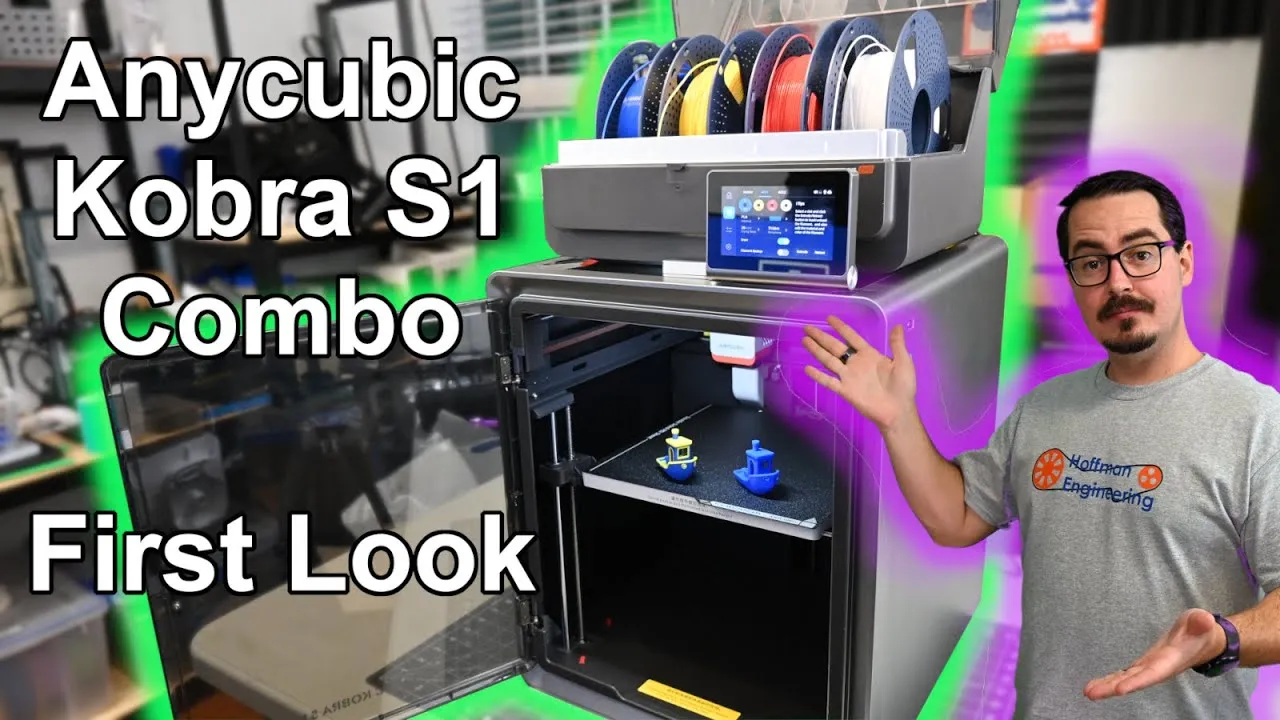
The Anycubic Kobra S1 Combo is Anycubic’s first fully enclosed CoreXY 3D printer, and with the ACE Pro on top it prints in up to 4 colors out of the box, or 8 with a second unit. I paid $649 for the combo at the time of recording, which made it the cheapest multicolor CoreXY printer on the market then. This first look covers the printer, the ACE Pro, setup and the real cost of a multicolor print, while I keep testing for the full review.
Kobra S1 CoreXY Speed and Build Volume
The Kobra S1 is a filament printer with a 250 x 250 x 250mm build volume. Anycubic took what it learned from the multi-material Kobra 3 and moved it onto a CoreXY frame. Two stationary motors drive a belt loop that moves the hotend, which is what lets the S1 claim speeds up to 600mm/s and acceleration up to 20,000mm/s².
The sample files include a 15 minute 3D Benchy, and that profile isn’t pushing the printer anywhere near its limits. It’s tuned for quality. The layer lines are very consistent and the overhangs don’t droop. A true speed-tuned Benchy is on my list for later.
KobraOS, Touchscreen and Auto Calibration
On top sits a 4.3 inch touchscreen that folds open. The menus are laid out well and it responds quickly. Wi-Fi lets you send prints from your computer or through Anycubic’s cloud service, and firmware updates arrive over the air.
The S1 runs KobraOS, Anycubic’s custom version of Klipper. You get auto bed leveling and an auto Z offset, so you won’t be sliding paper under the nozzle. It also has vibration compensation for input shaping and pressure advance, which keep ringing, ghosting and echoes off your prints.
ACE Pro Multicolor Printing on the Kobra S1
The real draw is pairing the S1 with the ACE Pro (Anycubic Color Engine). It holds 4 spools and feeds them to the back of the printer. At a color change, the hotend moves to the front, cuts the filament, retracts the old color and pushes the new one through until it runs clean. The purged plastic gets ejected out the back and printing picks up again.
The ACE Pro does more than switch colors:
- Backup spools. When a spool runs out, it switches to the next spool of the same material and color.
- RFID. Anycubic filament is detected automatically by type and color.
- Drying. A built-in heater pulls moisture out of your filament. As my moisture testing showed, dry filament makes a big difference in print quality.
The ACE Pro in the S1 Combo differs slightly from the Kobra 3’s. New spool guides on the lid keep spools in place during the longer retractions the S1 needs.
Multicolor Print Time and Purge Waste
My first two-color Benchy came out clean, even switching from a heavily pigmented blue to a light yellow. But multicolor costs time and plastic, same as on the Kobra 3.
With the default profile in Anycubic Slicer Next, the slicer estimated 1 hour and 9 minutes of printing and 8 hours of color changes. The real print took 9 hours and 23 minutes.
Then there’s the waste. That 10.9 gram Benchy produced 183 grams of purged filament, 17 times the weight of the print itself. The red and blue Benchy I printed on the Kobra 3 produced 118 grams, so the S1 wasted 65 grams more.
To be fair, the purge amount is adjustable, and I’ll be looking at how far it can be cut down (a follow-up video covers that). The bigger lesson is to fill the build plate. A full plate of multicolor Benchies uses about the same purge as a single one.
Unboxing and Setup Time
It took me about 20 minutes to unbox the Kobra S1 Combo, plug everything in and start the automatic calibration, and then I was printing. The manual walks you through every step, and I think anyone could get it running without trouble.
Verdict: Should You Buy the Anycubic Kobra S1 Combo?
These are early impressions from the first few prints, not a full review. So far the Kobra S1 looks like a polished enclosed CoreXY printer: quick to set up, easy to use, and its sample prints show quality-focused tuning with plenty of speed headroom. The ACE Pro’s color changes are clean, and drying plus backup spools make it useful even for single-color printing.
The thing to plan around is multicolor cost. A two-color Benchy took over 9 hours and threw away 17 times its own weight in purge. If multicolor is why you’re buying, batch your parts onto full plates and expect to tune the purge settings.
Still on my list for the full review: whether the Kobra 3’s ACE Pro works with the S1, and how much the purge can be reduced. Anycubic has since replaced this combo with a Kobra S1 + ACE 2 Pro Combo, listed at $429 at the time of writing, and sells the printer alone for $349. I haven’t tested the ACE 2 Pro. Use code HOFFENG for $15 off at Anycubic. Check the latest price on the Anycubic Kobra S1 Combo
Pros and cons
✓ Pros
- Anycubic's 15 minute sample Benchy came out with consistent layer lines and no drooping overhangs
- Color changes are clean, even going from a dark blue to a light yellow
- ACE Pro adds filament drying, automatic backup spool switching and RFID detection
- Auto bed leveling and auto Z offset, so no paper test
- Responsive fold-up touchscreen with Wi-Fi printing and over-the-air updates
- About 20 minutes from unboxing to printing, with a clear manual
- $649 for the combo at the time of recording
✗ Cons
- A two-color Benchy took 9 hours and 23 minutes, about 8 of them spent swapping colors
- 183 grams of purge waste for a 10.9 gram Benchy
- Purged 65 grams more than the same test on the Kobra 3
- Default purge settings need tuning, and single small multicolor prints waste the most
Specs
| Build Volume | 250 x 250 x 250mm |
|---|---|
| Motion System | CoreXY, fully enclosed |
| Max Speed | 600mm/s |
| Max Acceleration | 20,000mm/s² |
| Multicolor | 4 colors with one ACE Pro, up to 8 with two |
| Firmware | KobraOS (Anycubic's Klipper-based firmware) |
| Calibration | Auto bed leveling, auto Z offset, input shaping, pressure advance |
| Display | 4.3 inch fold-up touchscreen |
| Connectivity | Wi-Fi, Anycubic cloud, over-the-air updates |
Where to buy
- Anycubic Kobra S1 + ACE 2 Pro Combo (Anycubic Store, replaces the reviewed ACE Pro combo)$429 →
- Anycubic Kobra S1, Printer Only (Amazon)Check price →
- Anycubic Kobra 3 Combo (Amazon)Check price →
Use code HOFFENG for $15 off at Anycubic US. Prices may have changed since this review.
FAQ
Is the Anycubic Kobra S1 Combo worth it?
From the first prints, it looks like a fast, polished enclosed CoreXY printer that was easy to set up, and the color changes are clean. The catch is multicolor waste and time. If you plan to print in several colors often, fill the plate and tune the purge settings, or the filament bill adds up fast.
How many colors can the Anycubic Kobra S1 print?
The Kobra S1 Combo comes with one ACE Pro, which holds 4 spools for 4-color prints. Connect a second ACE Pro and it can print up to 8 colors.
How much filament does the Kobra S1 waste on multicolor prints?
With the default profile in Anycubic Slicer Next, a two-color 3D Benchy weighing 10.9 grams produced 183 grams of purge, about 17 times the weight of the print. The purge amount is adjustable, and a full plate of multicolor parts uses about the same purge as a single one.
How fast is the Anycubic Kobra S1?
Anycubic rates it at up to 600mm/s with 20,000mm/s² acceleration. The included sample Benchy prints in 15 minutes, and it's tuned for quality rather than pushing those limits.
I bought this Anycubic Kobra S1 Combo myself with support from my Patreon members. Sunlu sponsored the filament used in the video. This post contains affiliate links. If you purchase through them, I may earn a small commission at no extra cost to you. All opinions are my own.