FilaPartner E1 Filament Dryer Review: Buy It for the Boxes
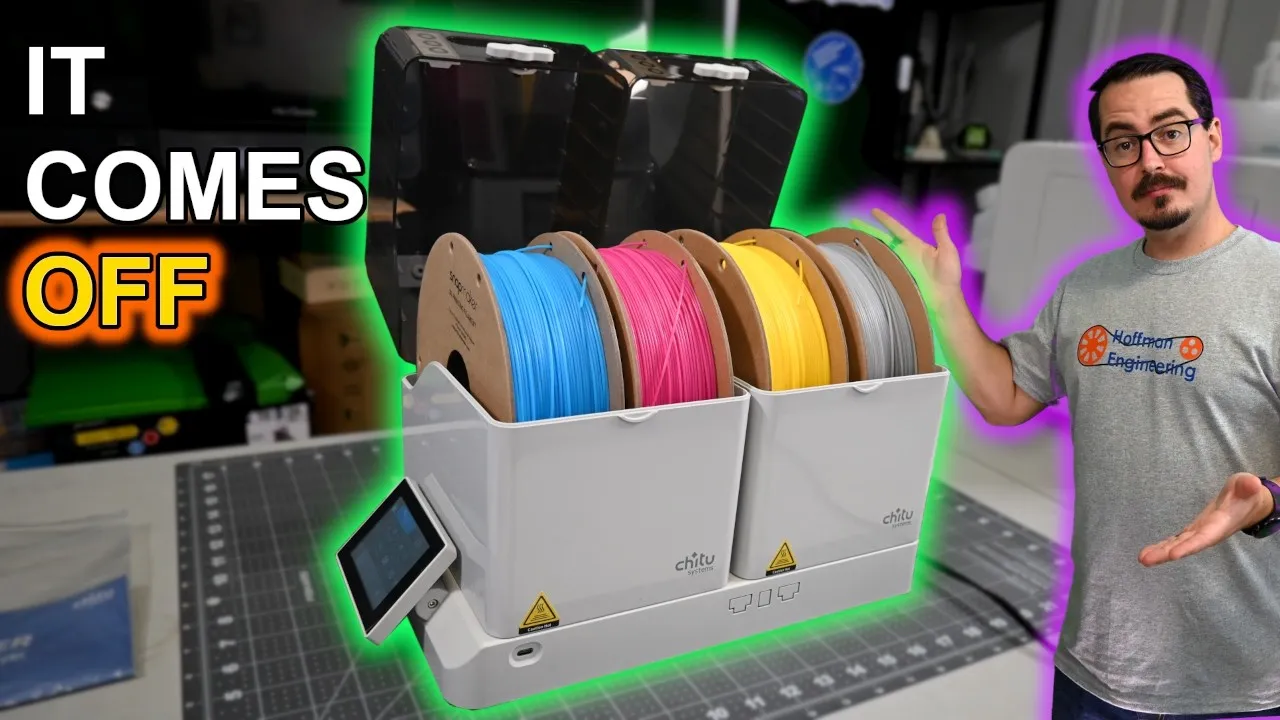
A capable four-spool filament dryer with ordinary drying performance. Buy it if you're tired of moving dried filament into separate dry boxes, because its two chambers come off and become sealed storage you can print from.
Check price at Chitu SystemsOn this page
Two sealed boxes, four spools, and two different drying temperatures at the same time. That’s the pitch for the Chitu Systems FilaPartner E1, but after a month of testing, the drying isn’t the part I’d buy it for. This Chitu FilaPartner E1 review covers the thermal camera results, a drying test across eight spools, and why the removable dry boxes are the reason this filament dryer costs more than a basic one.
FilaPartner E1 Design: Two Chambers, Four Spools
The FilaPartner E1 is a base with two removable chambers. Each chamber holds two standard one-kilogram spools, for four spools total. Each side has its own PTC heater and its own temperature control, with 240 watts of rated power across the system and a range of 45 to 70°C.
The base is plain. Warm air comes up through two sets of vents, one per chamber. The boxes fit on either side and can be rotated, so you choose where the filament guide tubes exit.
Because the chambers are independent, you can run a different temperature and timer on each side. That makes the four-spool capacity a lot more useful. During testing I had TPU drying on one side while PLA ran at a different temperature on the other. You can also run one chamber by itself.
Removable Dry Boxes That Seal for Storage
The unusual part is underneath each box. Openings in the bottom line up with the heater vents on the base, and sliding magnetic covers close those openings when the box comes off.
Open the vents and set the box on the base, and it’s a filament dryer. Lift it off and close the vents, and it’s a sealed dry box you can put on a shelf.
Inside each box you get two spool rollers and a compartment in the back for desiccant. That desiccant dries back out the next time the box sits on the heater, so you aren’t pulling silica packs out and recharging them separately. It’s the feature I’d steal for every other filament dryer I own.
Touchscreen and Drying Modes
A 3.5-inch resistive touchscreen sits on the side of the base. It’s basic, but I found it easy to use. I’ve seen complaints that the resistive screen needs hard presses. Mine stayed responsive for the whole month.
You get built-in material recommendations, custom settings, and manual control anywhere from 45 to 70°C. There are a few automatic features too:
- Automatic Drying watches the humidity inside the chamber. The heater turns on above 50 percent and stops once it drops below 25 percent.
- Silent Mode slows the fan to cut noise. Chitu says that comes with roughly a 30 percent hit to heating efficiency.
- Box Detection checks that a chamber is installed before that side can heat. Pull a box off mid-cycle and that heater shuts off while the other side keeps going.
Thermal Camera Test: Setpoint vs. Filament Temperature
The number on the screen and the temperature at the filament aren’t always the same thing, so I checked both chambers with a thermal camera at different setpoints.
At a 55°C setting, I measured around 50°C across most of the filament. There was also a small cooler area along the bottom where the spool rests on the rollers, generally around four degrees lower. I’d much rather see a dryer undershoot by a few degrees than overshoot and risk melting the filament. The warm air enters from below and circulates around the spools, so nothing is heated from one concentrated hot surface. Overall, the temperature control was better than I expected.
There is one limit. 45°C is as low as it goes. That’s reasonable for most PLA, but if you prefer a gentle 40°C cycle for certain materials, you can’t run one here. Chitu’s documentation is a little confusing on this point: the main specifications say 45 to 70°C, while some other documentation still lists a lower minimum. On the machine I tested, 45°C is the floor.
For noise, I measured around 49 decibels from two feet away while drying. It was quieter than the printers around it and never bothered me in the studio.
Filament Drying Test: Eight Spools on a Scale
Temperature is only half the question, so I also measured what came out of the filament. I tested eight spools of PLA and TPU across two batches, weighing each spool before drying and again throughout the cycle on a scale that reads to a tenth of a gram.
Mass loss is a practical proxy for moisture removed. This isn’t laboratory moisture testing, and a change of a few grams on a one-kilogram object comes with measurement noise. One spool appeared to gain roughly a gram between readings before dropping again later. It wasn’t absorbing water inside a heated box. That’s the noise floor of this kind of test, so I wouldn’t read much into any single hourly number.
The overall trend was consistent. Across all eight spools, I measured between about 2.5 and 5.1 grams of total mass loss over eight hours. Most of it happened early, and after the first couple of hours the curves generally flattened out.
Those numbers match what I’d expect from filament straight out of the box, and they show that new rolls carry moisture too. They also tell me the E1 does a normal job as a filament dryer. If all you need is heat for one spool, there are much cheaper ways to get it.
Sealed Filament Storage and Printing From the Box
So the extra money goes toward what happens after the cycle ends.
Dried filament starts absorbing moisture again as soon as it’s back in open air. How fast that matters depends on the material and your environment, but drying a spool and then leaving it exposed isn’t a great long-term workflow.
With the E1, the filament doesn’t move. When drying finishes, you lift the whole chamber off, close the magnetic vents, and put the box on a shelf with the filament and desiccant still inside. In my testing, the humidity inside stayed low after I removed the boxes and sealed them.
When you want to print, carry the box to the printer, insert the PTFE tubes, and print directly from the sealed box. That’s a great fit for hygroscopic materials like nylon or PVA. When the filament needs drying again, the same box goes back on the base and the desiccant is regenerated along with it.
My least favorite part is the passive humidity indicator cards on the front. Mine barely changed enough to read clearly all month. They can give you a rough indication while a box sits on the shelf, but on the machine, the digital humidity reading is much more useful.
Verdict: Should You Buy the Chitu FilaPartner E1?
After a month, I think the FilaPartner E1 is a capable four-spool filament dryer, but drying performance isn’t the main reason to spend the extra money on it. Much cheaper dryers can provide heat. What sets it apart is the workflow: dry four spools at two different temperatures, pull the chambers off, seal them for storage, print from the boxes, and put them back on the dryer later without moving filament between containers.
My biggest limitation is the 45°C minimum, and I’d like the passive humidity indicators to be easier to read. But the temperature control was good, both chambers ran independently the way they’re supposed to, and I didn’t run into any reliability problems in a month of use.
The FilaPartner E1 is listed at $138.99 with both dry boxes included, and additional two-spool boxes are $39 each, so you can add more dry storage than you can heat at one time. If you want the cheapest way to dry one spool, this isn’t the product I’d buy. If you’re tired of drying filament and then transferring it into separate dry boxes, it’s a much more interesting option.
Check the latest price at Chitu Systems
Pros and cons
✓ Pros
- Both chambers lift off the base and seal with magnetic vent covers, so the dryer and the dry storage are the same box
- Independent temperature and timer per chamber, so TPU and PLA can dry at different settings at the same time
- Desiccant inside each box gets dried back out every time the box goes back on the heater
- You can print directly from a sealed box through the PTFE tube ports
- Thermal camera showed about 50°C at the filament on a 55°C setting, undershooting instead of overshooting
- Around 49 dB from two feet away, quieter than the printers around it
- No reliability problems after a month of use
✗ Cons
- 45°C is the lowest setting, so a gentler 40°C cycle isn't an option
- Chitu's documentation is inconsistent about the minimum temperature
- Passive humidity indicator cards on the front barely changed enough to read
- Drying performance is ordinary, and much cheaper dryers can provide heat for one spool
- Silent Mode costs roughly 30 percent of heating efficiency, according to Chitu
Specs
| Capacity | Four standard 1kg spools, two per chamber |
|---|---|
| Chambers | Two removable dry boxes with sliding magnetic vent covers |
| Heating | One PTC heater per chamber, 240W rated across the system |
| Temperature Range | 45 to 70°C, set independently per chamber |
| Temperature at the Filament (tested) | Around 50°C at a 55°C setting |
| Display | 3.5-inch resistive touchscreen |
| Automatic Drying | Heater turns on above 50% humidity and stops below 25% |
| Noise (tested) | Around 49 dB from two feet away while drying |
Where to buy
- Chitu Systems FilaPartner E1 (two dry boxes included)$138.99 →
- Extra two-spool dry box for the FilaPartner E1$39 →
Prices may have changed since this review.
FAQ
Is the Chitu FilaPartner E1 worth it?
It depends on what you want it for. As a dryer it did a normal job in my testing, and there are much cheaper ways to heat one spool. It's worth the extra money if you want to stop transferring dried filament into separate dry boxes, because the two chambers come off the base, seal up, and work as storage you can print from.
How much moisture does the FilaPartner E1 remove from filament?
Across eight spools of PLA and TPU, I measured between about 2.5 and 5.1 grams of total mass loss over eight hours, using a scale that reads to a tenth of a gram. Most of that change happened in the first couple of hours. Mass loss is a practical proxy for moisture here, not laboratory moisture testing, so single hourly readings carry some noise.
What is the temperature range of the FilaPartner E1?
The range is 45 to 70°C, and each chamber is set independently. On the machine I tested, 45°C is the floor, even though some of Chitu's documentation lists a lower minimum. With a thermal camera I measured around 50°C across most of the filament at a 55°C setting.
Can you print directly from the FilaPartner E1 dry boxes?
Yes. You can carry a sealed box to the printer, insert the PTFE tubes, and print from it with the filament and desiccant still inside. That is most useful for hygroscopic materials like nylon or PVA.
How loud is the FilaPartner E1?
I measured around 49 decibels from two feet away while it was drying. It was quieter than the printers around it and never bothered me while working in the studio. There is also a Silent Mode that slows the fan, which Chitu says comes with roughly a 30 percent hit to heating efficiency.
This FilaPartner E1 was provided by Chitu Systems for review. This post contains affiliate links. If you purchase through them, I may earn a small commission at no extra cost to you. All opinions are my own.