Formlabs Creator Resin Review: Print Times and Odor Tested
A good pick if you want ACMO-free resin with validated settings and can accept prints that take about 2 to 2.5 times as long. Formlabs has since retired the Creator Series, so check what stock is left.
Check price at AmazonOn this page
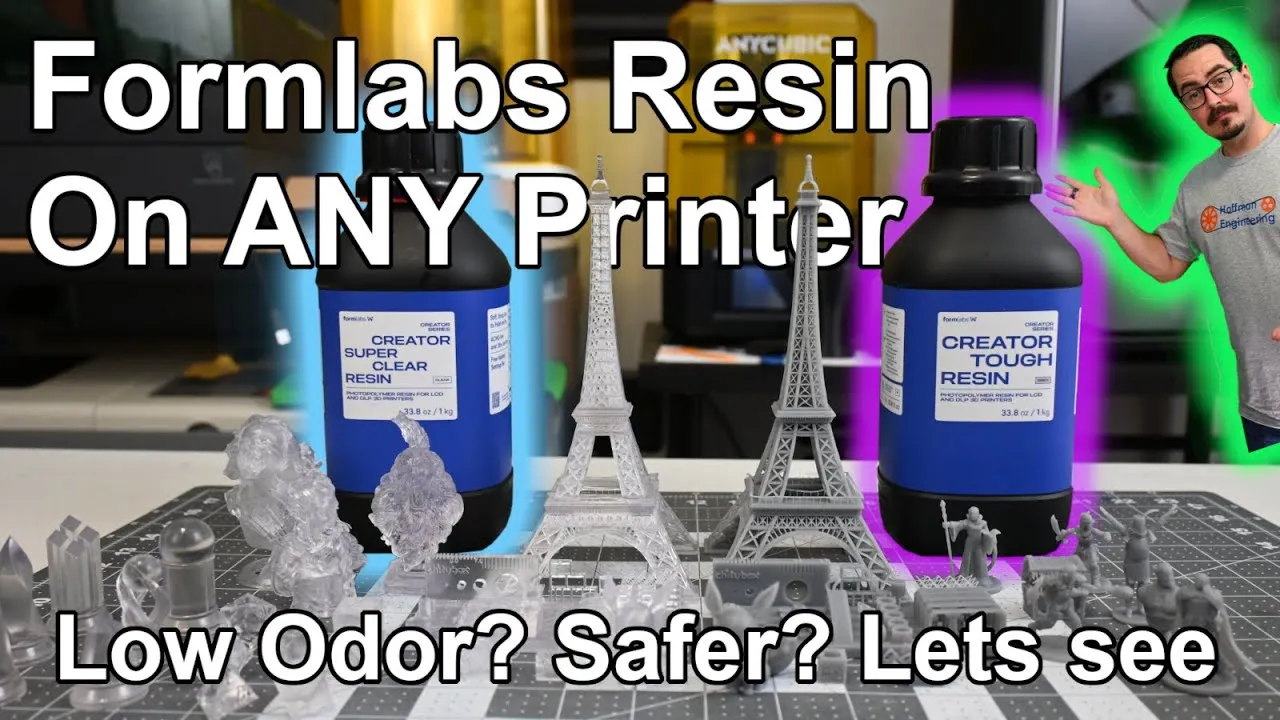
Formlabs has long been a walled garden: its own high-end printers, its own resin. The Formlabs Creator Series broke that pattern with resin made for hobbyist LCD printers from other brands, marketed as ultra-low odor and ACMO-free. In this Formlabs Creator Series resin review, I printed miniatures, torture tests, dice and a 200mm Eiffel Tower in Creator Tough and Creator Super Clear over a month to see how the detail, odor and print times hold up.
Formlabs Creator Series Resin: Tough and Super Clear
The Creator Series has two resins. Creator Tough is a gray, ABS-like resin that is impact resistant and semi-flexible. It’s built for parts that get handled, or mishandled, which makes it a natural fit for miniatures and figurines.
Creator Super Clear is the general-purpose option. It’s stiff and strong, made for parts that sit on a shelf and show off detail.
All of my testing ran on an Anycubic Photon Mono M5. Both resins wash in regular IPA, so you don’t need any Formlabs equipment to use them.
Validated Print Settings for Hobbyist Resin Printers
The first question with any new resin is what settings to use. Most bottles give you an exposure time on the label and, if you’re lucky, a bottom layer exposure.
Formlabs went much further. During development, it tested the Creator Series on seven of the most popular hobbyist printers from a range of manufacturers and published validated profiles for each one. Every printer gets a “fast” and a “reliable” profile, and you can download them in Chitubox or Lychee format or read every setting in the technical data sheet.
My Photon Mono M5 wasn’t on the exact list, so I grabbed the closest model’s profile, loaded it and started printing. I haven’t seen another resin maker share validated settings for this many printers, and it takes the guesswork out of the first print.
Why Creator Series Resin Needs Longer Exposure Times
The first thing you’ll notice in those profiles is the exposure time. For the Photon Mono M5, Formlabs recommends 9 seconds per layer. A Sunlu resin I use calls for 3 seconds on the same monochrome screen. That’s about 3 times longer.
The reason is ACMO, short for 4-Acryloylmorpholine. According to Formlabs, many resin makers use it because it’s cheap and highly reactive, which keeps prices low and print speeds fast. The EPA has issued a Significant New Use Rule for ACMO because of its effects on skin contact and when you breathe the vapors, and Formlabs believes it is behind the headaches and eye and throat irritation people report from resin printing. Formlabs has a blog post on ACMO and resin safety with the full details.
Leaving ACMO out means using less reactive chemicals, and those need longer exposure. To compensate, Formlabs tuned lift speeds and distances in its profiles so the rest of each layer goes faster. The print time section below shows how that works out.
Creator Tough Resin Print Results
Creator Tough calls for a 10 minute wash in IPA or Formlabs Washing Solution, then a 10 minute post-cure.
As a Dungeons and Dragons player, this is the resin I’d reach for for miniatures. It bends a fair amount before it breaks, so thin staffs, swords and tails don’t snap off easily, and it still captures the fine detail you expect from a resin printer.
The Chitubox torture test was impressive. The gap test started to close around 0.2mm, and the 0.2mm wall started to fail. Bridging was flawless, and so was the thin lattice work. It failed all 4 light support tests but passed all 4 medium and all 4 heavy ones.
The Eiffel Tower showed the downside of that flexibility. The railing and pillars around the first floor printed, but I think they buckled during washing and curing. The thinnest lattice members have a slight wave to them too. Thicker members stayed straight.
Creator Super Clear Resin Print Results
Creator Super Clear uses very similar settings, with the same long exposures and slightly faster recommended lift speeds. Because it’s clear, you can watch each layer cure in the vat. It washes for 10 minutes and post-cures in only 5.
This resin is much stiffer. There’s almost no flex, so it snaps before it bends. That made support removal tricky: cut a support pillar and there’s a chance it flies across the room.
The prints themselves are beautiful. Super Clear stays clear whether the part is solid, hollow or very thin, and it holds high detail where some clear resins soften it. The flowing hair on the Bearded Yell bust catches light in a way that’s hard to stop looking at.
On the Chitubox torture test, Super Clear only struggled at the thinnest 0.2mm gap and wall. The lattice tests printed perfectly. It failed all 4 light support tests and one medium support test, and passed the rest.
You can also dye Creator Super Clear if you want tinted prints.
Polishing and Clear-Coating Super Clear Prints
With a clear resin, I wanted to know two things: does polishing make it see-through, and does a clear coat help?
I printed dice and chess pieces. Straight off the printer, still wet with resin, they looked incredible. After washing and curing, some of that transparency went away, as expected.
For the dice, I sanded each face through 2000 grit, moved to Micro-Mesh pads up to 12,000 grit, and finished with Meguiar’s PlastX polishing compound. My custom dice design and polishing guide covers that process in full. The clarity improved noticeably, and the resin holds a polish surprisingly well. The dice also had almost no internal voids or bubbles.
On the chess pieces, I tried a crystal-clear enamel. It made them more see-through, but the coating left a slight surface texture. It’s a promising technique that needs more experimenting to find the right coating.
Removing Prints From the Build Plate
Creator Tough came off the build plate easily. Getting under the edge took little effort, the flexibility kept edges from chipping, and larger rafts came off in a single piece.
Creator Super Clear was another story. It stuck to the plate very well, probably too well. Getting under an edge took time, and parts didn’t want to pop off. The chess pieces took real force, and I mangled the build plate getting them free. Rafts were a pain too, because the stiff resin snapped into small pieces instead of bending.
Lowering the bottom layer exposure would probably help, and so would a flexible build plate. This printer doesn’t have one, so that’s a test for later.
Low Odor Claims: How the Creator Series Resins Smelled
“Low odor” is one of Formlabs’ main selling points for the Creator Series, and the two resins gave different answers.
Creator Super Clear lived up to it. There was almost no smell, even right after a print finished. I printed in an unventilated office with no headaches and no scratchy eyes or nose.
Creator Tough did not. The gray resin had a noticeable smell while printing, which my wife described as a less harsh ABS smell, like new plastic. The odor hung in the air the way other resins I’ve used do. After washing and curing, the parts had a distinct pine tree smell that faded over about a week. I’d recommend ventilation for Creator Tough.
Washing: IPA vs Formlabs Washing Solution
IPA is another big source of smells and headaches. My wash and cure station holds 15 liters of it, and it adds its own odor and irritation in a closed room.
Both Creator Series resins wash fine in regular IPA. But for a low-odor setup, I loved the Formlabs Washing Solution. It cleaned parts as well as IPA, without evaporating and filling the room the way alcohol does.
Print Time Compared to a Fast Standard Resin
To see what the longer exposure costs in practice, I printed the same Eiffel Tower in three resins, scaled to 200mm tall with 0.05mm layers:
| Resin | Print time |
|---|---|
| Formlabs Creator Tough | 29 hours 40 minutes |
| Formlabs Creator Super Clear | 22 hours 34 minutes |
| Anycubic Standard | 11 hours 58 minutes |
Even with 3 times the exposure, Super Clear took only 1.9 times as long as the Anycubic resin, thanks to its quicker peel moves between layers. Creator Tough’s profile uses slightly slower moves, so it took 2.5 times as long.
Formlabs Creator Series Resin Pricing
At recording, the Creator Series was regularly $45 per 1 kilogram bottle, about 1 liter of resin, and Creator Tough was on sale for $29.99. The regular price was higher than other resins on the market, and the sale price narrowed that gap a lot.
Since then, Formlabs has retired the Creator Series. Its Creator site no longer sells the resins, so I couldn’t confirm a current price. The Amazon listings from the video are linked below if you want to check for remaining stock.
Verdict: Should You Buy Formlabs Creator Series Resin?
It’s great to see Formlabs step outside its walled garden. The validated profiles for seven printers make it easy to dial in, whatever brand you own, and the published safety data sheet and technical data sheets are packed with useful detail. The ACMO research made me rethink my old “it’s only the IPA fumes” excuse.
Creator Tough was easy to print and easy to remove, with spectacular detail and enough flex for miniatures and figurines that get handled. It is not low odor, though. Creator Super Clear was nearly odorless, crystal clear with sharp detail, and hadn’t yellowed in the few weeks after printing, but it fights you on the build plate. Expect total print times about 2 to 2.5 times longer than a fast standard resin.
If resin safety is a priority and you want strong printability and mechanical properties, the Creator Series was worth trying. Formlabs has since retired it, so treat this as a look at what’s left in stock rather than a resin line you can count on restocking.
Check availability of Creator Tough on Amazon
Pros and cons
✓ Pros
- Validated print profiles for seven popular hobbyist printers, in fast and reliable versions
- ACMO-free, with the safety data sheet and technical data sheets published openly
- Creator Tough bends instead of snapping, so thin swords, staffs and tails survive handling
- Creator Super Clear had almost no odor, even right after printing
- Super Clear stays clear in solid, hollow and thin sections and holds fine detail
- Super Clear prints had almost no internal voids or bubbles and polished up well
- Strong Chitubox torture test results from both resins, with flawless lattice work
- Creator Tough pops off the build plate easily, and large rafts come off in one piece
✗ Cons
- Layer exposure is about 3 times longer, and total print times ran 1.9 to 2.5 times a standard resin
- Creator Tough is not low odor, and cured parts smelled of pine for about a week
- Creator Super Clear sticks to the build plate too well, and rafts snap into pieces
- Super Clear is stiff, so cut supports can go flying across the room
- Thin Creator Tough features can buckle during washing and curing
- Regular price of $45 per kilogram was higher than other resins
- Formlabs has since retired the Creator Series
Specs
| Resins Tested | Creator Tough (gray, ABS-like) and Creator Super Clear |
|---|---|
| Bottle Size | 1 kg (about 1 liter) |
| Formulation | ACMO-free |
| Creator Tough Properties | Impact resistant and semi-flexible, bends before it breaks |
| Creator Super Clear Properties | Stiff general-purpose resin, can be dyed to tint prints |
| Layer Exposure (Photon Mono M5) | 9 seconds per layer, about 3 times a typical fast resin |
| Validated Printer Profiles | 7 popular hobbyist printers, fast and reliable versions, Chitubox and Lychee formats |
| Wash Time | 10 minutes in IPA or Formlabs Washing Solution |
| Post-Cure Time | 10 minutes (Tough), 5 minutes (Super Clear) |
| Availability | Retired by Formlabs |
Where to buy
- Formlabs Creator Tough Resin (gray, 1 kg)Check price →
- Formlabs Creator Super Clear Resin (1 kg)Check price →
Prices may have changed since this review.
FAQ
Is Formlabs Creator Series resin still available?
Formlabs' Creator site now says the Creator Resin series is retired. The Amazon listings for Creator Tough and Creator Super Clear may still have stock, so check them before you plan around it.
What is ACMO, and why is Creator Series resin ACMO-free?
ACMO (4-Acryloylmorpholine) is a chemical common in 3D printing resins because it is cheap and highly reactive, which allows fast print speeds. The EPA has issued a Significant New Use Rule for it over skin contact and vapor concerns, and Formlabs links it to the headaches and eye and throat irritation some people get from resin printing. The Creator Series leaves it out.
Why does Formlabs Creator resin need longer exposure times?
Without ACMO, the resin uses less reactive chemicals that take longer to cure. On an Anycubic Photon Mono M5 the recommended exposure was 9 seconds per layer, about 3 times longer than a typical fast resin. Faster lift settings make up some of that, so total print times in testing were about 2 to 2.5 times longer, not 3.
What print settings should I use for Formlabs Creator resin?
Formlabs tested the resins on seven popular hobbyist printers and published validated profiles for each, with fast and reliable versions, in Chitubox and Lychee formats. Pick the profile for your printer, or the closest model, and start there. The technical data sheet lists every setting.
Is Formlabs Creator resin low odor?
Creator Super Clear was. There was almost no smell even right after printing, and no headaches in an unventilated office. Creator Tough had a noticeable new-plastic smell while printing, and cured parts smelled of pine for about a week, so ventilation is still a good idea with it.
The Formlabs Creator Series resin and Washing Solution were provided by Formlabs for review. Formlabs did not pay for this review. This post contains affiliate links. If you purchase through them, I may earn a small commission at no extra cost to you. All opinions are my own.