Genmitsu Cubiko Review: An Enclosed Beginner CNC Router
A compact, fully enclosed CNC router that makes a good first machine for wood, foam and PCB milling, as long as you accept slow aluminum work and the time it takes to learn CAM.
Check priceOn this page
CNC routers tend to be big, loud and expensive, which keeps a lot of people from ever trying one. The SainSmart Genmitsu Cubiko is a fully enclosed desktop CNC router small enough to live on your workbench, and after a month of engraving hardwoods, carving foam, milling PCBs and pushing it through aluminum, this Genmitsu Cubiko review covers what a beginner can expect from it, where it struggles, and what it costs today.
Fully Enclosed Desktop CNC Design
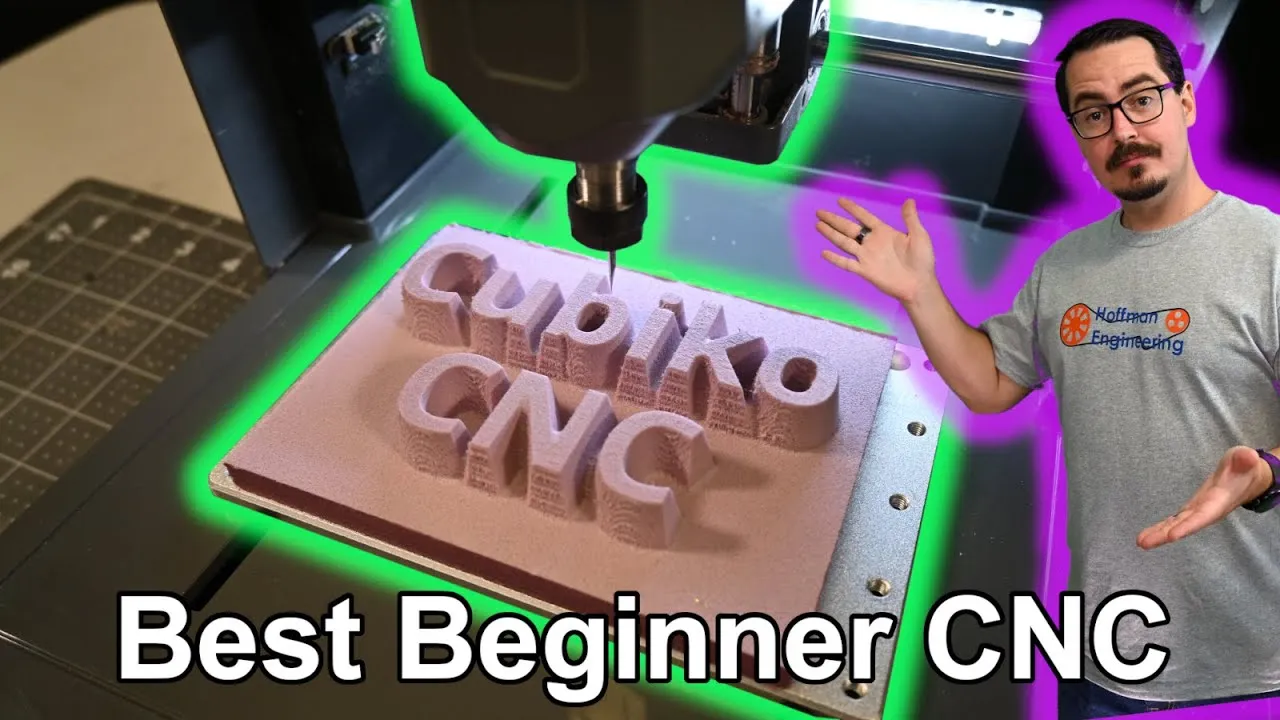
The Cubiko is a subtractive machine: a spinning end mill carves material away, and SainSmart designs it for woods, plastics and soft metals like aluminum. What sets it apart is the full enclosure. With the lid on, it does an excellent job keeping chips and dust inside, and the lid lifts straight off when you need to get in.
It’s also small. The whole machine measures 300 x 335 x 318mm (11.81 x 13.19 x 12.52 in) and weighs 7.85kg (17.7 lbs), so it’s easy to find room on a desk, or to put it away when you’re done. It arrives assembled, too.
A switch at the top detects the lid and pauses the job when you lift it. I’ve seen other reviewers say the lid can flex enough to miss the switch, but mine seated properly and engaged it every time. The one catch is the groove around the base that the lid sits in. Chips fall into it whenever you lift the lid, so vacuum it out each time and the lid will keep seating correctly.
Work Area and Work Holding
The work area is 150 x 110 x 40mm (5.91 x 4.33 x 1.57 in). That’s small next to full-size benchtop routers, but it turned out to be more useful than the numbers suggest.
The bed is an aluminum plate with M5 threaded holes. SainSmart includes two aluminum clamps and bolts in five lengths, so you can pick one that won’t poke through the plate and dig into the base. The odd part is that you only get three bolts of each length. Clamping a tall block of aluminum, I wanted four of the longest bolts and had to use two shorter ones, which left the clamps at a strange angle.
My preferred method ended up being XFasten double-sided tape. It held surprisingly well on the Cubiko, and none of my material came loose.
Auto Z-Probe and PCB Height Mapping
At the back right of the work surface is the auto Z-probe point. Trigger the probe and the Cubiko moves the tool over that spot and lowers it until it touches, so it knows exactly how long your tool is and sets Z-zero accurately.
The same probe can build a height map on conductive materials, which is what makes PCB milling practical. Using the included probe cable, you clip the alligator clip to your tool and the Y-connector to the aluminum plate, set the area and number of points, and let it probe. The Cubiko then compensates for any variation in the surface as it engraves, keeping the depth consistent.
Two things to know. With a V-bit, the probing leaves small pin-pricks on the surface that are visible at the right angle. And remove that probe cable before the job starts. The file I ran had a built-in HOLD command, I assume for this exact situation, so no harm done. There’s also a red emergency stop button on the right side.
75W Spindle, Collet and Included Bits
The Cubiko has a 75W spindle with a maximum of 10,000 RPM and an ER11 collet for 1/8 in (3mm) shanks. For the materials it’s designed for, the spindle felt reasonably powerful. It held speed while depth cutting hardwoods.
In the box you get seven 1/8 in 20-degree V-bits for engraving and three drill bits. Beyond that you can buy whatever 1/8 in shank bits your projects need. I picked up a Genmitsu end mill variety pack, and its ball end mills handled the contour carving shown below.
Three Ways to Control the Cubiko
Control panel. The full-color LCD panel attaches magnetically to the front and pops off for handheld use. It shows position, speeds and feeds, and handles homing and Z-probing. Insert a microSD card in the side and you can start and stop jobs offline. It feels light and a little flimsy in your hand, but it does the job.
Genmitsu app. The iOS and Android app connects the Cubiko to your Wi-Fi network for full remote control: home, jog, start and stop the spindle, run the Z-probe, and start jobs saved on the SD card. It also has a built-in material and bit reference with speeds and feeds for many Genmitsu bits, which gives you a solid starting point.
Computer over USB. Any GRBL-compatible sender works. SainSmart’s quick-start guide lists a few options, and Candle and Universal G-code Sender are on the SD card. I used UGS for most of my testing. It covers homing and zeroing, shows the G-code with a visualizer, and makes starting and stopping jobs easy.
CAM Software and the G-Code Learning Curve
Generating the G-code is the harder part. CAM is a skill of its own, and it takes time to get the most out of any CNC router. SainSmart publishes guides for Fusion 360, Easel and VCarve, which are a good place to start. I used Kiri:Moto, a simple browser-based CAM tool that also integrates with Onshape.
My CNC skills were about ten years out of practice when I started with the Cubiko, and SainSmart’s documentation helped me shake off the rust and start producing decent G-code files.
Wood Engraving and Profiling Results
V-bit engraving. Text engraving with the included V-bits can look good, but the wood makes a big difference. The Genmitsu test file on the included 3mm plywood came out rough, and so did my Hoffman Engineering text. The same files on hardwood turned out great.
Roughing and profiling. Flat end mill profiling also depends heavily on the material. Construction pine had a lot of tearout. Hardwood was much better, though the thin-walled triangular pockets cut diagonally to the grain mostly tore away. On the circle and square, it looks like the Y-axis shifted during the first layer, leaving a small step into the second. The rest of that cut wasn’t affected, and the pocket on the right has a fairly smooth bottom, although the edges could be cleaner.
3D Contour Carving in Oak and Poplar
Contour carving is where the Cubiko shines. With a 1/8 in ball end mill, it ran a roughing pass to clear the bulk of the material and then a finishing contour pass. On oak, the filigree design came through well, although some of the detail is finer than a 1/8 in ball end mill can resolve.
The koi fish on poplar turned out amazingly well. Most of the surface is very smooth, and you can even see the detail in the scales. A few steep areas have some fraying that a bit of fine-grit sandpaper would clean up. That carving took about 2 hours.
Foam Cutting
Polystyrene foam board is no match for the Cubiko. The roughing cut went through it easily (my G-code didn’t quite cut all the way around the pentagon, which is on me). The contour pass on the raised lettering was fun to watch, with the foam peeling away cleanly around letters with a 9-degree draft angle. Cleanup afterward is satisfying, too.
PCB Milling on the Cubiko
Thanks to the height map, the Cubiko cut PCB traces fairly consistently. On SainSmart’s sample PCB file, a few spots didn’t fully close the outline. It doesn’t look like a G-code problem, but I can’t say whether it came from how I zeroed the V-bit, the height map, or something in the machine itself. PCB design is outside my wheelhouse, so I’ll leave the deeper testing to people with more experience there.
Can the Genmitsu Cubiko Cut Aluminum?
SainSmart says the Cubiko can handle “soft metalworking.” With no aluminum CNC experience, I used a 1/8 in titanium coated end mill at 10,000 RPM, 100mm/min and a 0.1mm depth of cut. It did cut through without snapping the bit, reaching 2mm deep in a little under an hour.
The machine didn’t enjoy it. It sounded rough, and you could see the bit and spindle deflecting as it moved. So aluminum is possible, but it’s very slow, and you’ll want hearing protection. If you plan to try it, a piece of aluminum bar stock is an inexpensive way to experiment.
Noise Levels
SainSmart markets the enclosure as making the Cubiko low-noise, but that wasn’t my experience. With the lid on and only the spindle running at 10,000 RPM, I measured about 70 dB. Spikes to 80 dB while engraving were common, and it hit 83 dB cutting aluminum.
The surface it sits on matters, since a table can amplify the vibration. The top panel sometimes vibrates as well, and setting the roll of double-sided tape on it damped that. Either way, you wouldn’t want this running in your home office for hours.
Price and Optional Accessories
The Cubiko was on sale for $349 when I recorded the video. It’s $399 on SainSmart’s store as of this writing, so check the current price before you buy.
At recording, the optional accessories were very inexpensive: an upgraded 20,000 RPM spindle for $21, a drawing tool for $32, a dust shoe for $16 and a 5.5W laser module for $80. Those were the prices at recording, so expect them to have changed too. For someone who wants to learn a new skill without spending a few thousand dollars on a CNC router, that’s a low cost of entry.
Verdict: Should You Buy the Genmitsu Cubiko?
The Genmitsu Cubiko is an excellent beginner CNC router. If you want to try CNC and don’t know where to start, it’s a low-cost way to build experience. The enclosure keeps chips contained while taking up minimal bench space, having the control panel, app and computer as options is convenient, and the auto-probe and height map make delicate PCB work possible. Coming back to CNC after a decade away, I found it a good platform to get back into it.
Know its limits going in. It isn’t a rigid machine, so don’t buy it for metal. It can cut some aluminum, but not fast and not with a good surface finish. Woods and foam are where it does well. And while it’s plug and play on the hardware side, CAM software hasn’t improved the way 3D printer slicers have over the last decade, so creating your own designs will take time and energy to learn.
For small projects that fit the work area, like coasters, soap dishes and signs, the Cubiko can be the first machine that leads you to bigger, more capable CNC routers. If you go in aware of its limitations, it will treat you well.
Check the latest price on the Genmitsu Cubiko at SainSmart
Pros and cons
✓ Pros
- Fully enclosed design contains chips and dust, and the lid lifts off for easy access
- Compact 300 x 335 x 318mm footprint and 7.85kg weight fit on a desk or shelf
- Arrives assembled with no build required
- Auto Z-probe and height mapping make PCB milling possible
- Three ways to control it, from the detachable LCD panel, the Genmitsu app or a computer over USB
- App includes a speeds and feeds reference for Genmitsu bits and materials
- Excellent contour carving on hardwoods, with a smooth koi fish relief on poplar
- Lid switch pauses the job every time the cover comes off
✗ Cons
- Small 150 x 110 x 40mm work area
- Not rigid enough for real metal work. Aluminum cut 2mm deep in a little under an hour, with visible deflection
- Louder than the low-noise claim suggests, up to 83 dB while cutting aluminum
- Only 3 bolts of each length and two clamps for work holding
- Groove around the base collects chips and needs vacuuming each time
- Handheld control panel feels light and flimsy
- Learning CAM to make your own toolpaths still takes time and effort
Specs
| Work Area | 150 x 110 x 40mm (5.91 x 4.33 x 1.57 in) |
|---|---|
| Spindle | 75W, 10,000 RPM max |
| Collet | ER11, 1/8 in (3mm) shank |
| Machine Size | 300 x 335 x 318mm (11.81 x 13.19 x 12.52 in) |
| Weight | 7.85kg (17.7 lbs) |
| Enclosure | Full, removable lid with a pause-on-open switch |
| Work Surface | Aluminum plate with M5 threaded holes |
| Probing | Auto Z-probe plus height map for conductive materials |
| Control | Detachable LCD panel with microSD, Genmitsu app over Wi-Fi, USB (GRBL) |
| Noise (measured) | About 70 dB spindle only, spikes to 80 dB engraving, 83 dB in aluminum |
Where to buy
- SainSmart Genmitsu Cubiko CNC Router$399 →
- Genmitsu 1/8" Shank Router Bits (SainSmart)Check price →
- Genmitsu 40pcs End Mills (Amazon)Check price →
- XFasten Double Sided Tape (Amazon)Check price →
- Aluminum Bar Stock (Amazon)Check price →
Prices may have changed since this review.
FAQ
Is the Genmitsu Cubiko worth it for a beginner?
If you want to learn CNC without spending thousands of dollars, yes. It is enclosed, compact, arrives assembled and gave good results on hardwoods, foam and PCBs over a month of testing. Plan to spend time learning CAM software, and don't buy it for metal work.
Can the Genmitsu Cubiko cut aluminum?
Technically, yes, but slowly. With a 1/8 in titanium coated end mill at 10,000 RPM, 100mm/min and a 0.1mm depth of cut, it went 2mm deep in a little under an hour. It sounded rough and the bit and spindle visibly deflected, so wear hearing protection and keep expectations low.
What materials can the Genmitsu Cubiko cut?
SainSmart designs it for woods, plastics and soft metals like aluminum. In testing, hardwoods like oak and poplar gave the best results, polystyrene foam board cut easily, and PCB milling worked with the height map. Construction pine and thin plywood showed a lot of tearout.
How loud is the Genmitsu Cubiko?
With the lid on and only the spindle running at 10,000 RPM, it read about 70 dB. Engraving spikes to 80 dB were common, and aluminum cutting hit 83 dB. Your table can amplify the vibration, so it isn't something you'd want running in a home office for hours.
What software works with the Genmitsu Cubiko?
Any GRBL-compatible sender works over USB. SainSmart puts Candle and Universal G-code Sender on the SD card, and I used UGS for most testing. For CAM, SainSmart has guides for Fusion 360, Easel and VCarve, and I used the browser-based Kiri:Moto.
This Genmitsu Cubiko was provided by SainSmart for review. This post contains affiliate links. If you purchase through them, I may earn a small commission at no extra cost to you. All opinions are my own.