Mecpow M1 Review: A Tiny Class 1 Enclosed Laser for $179
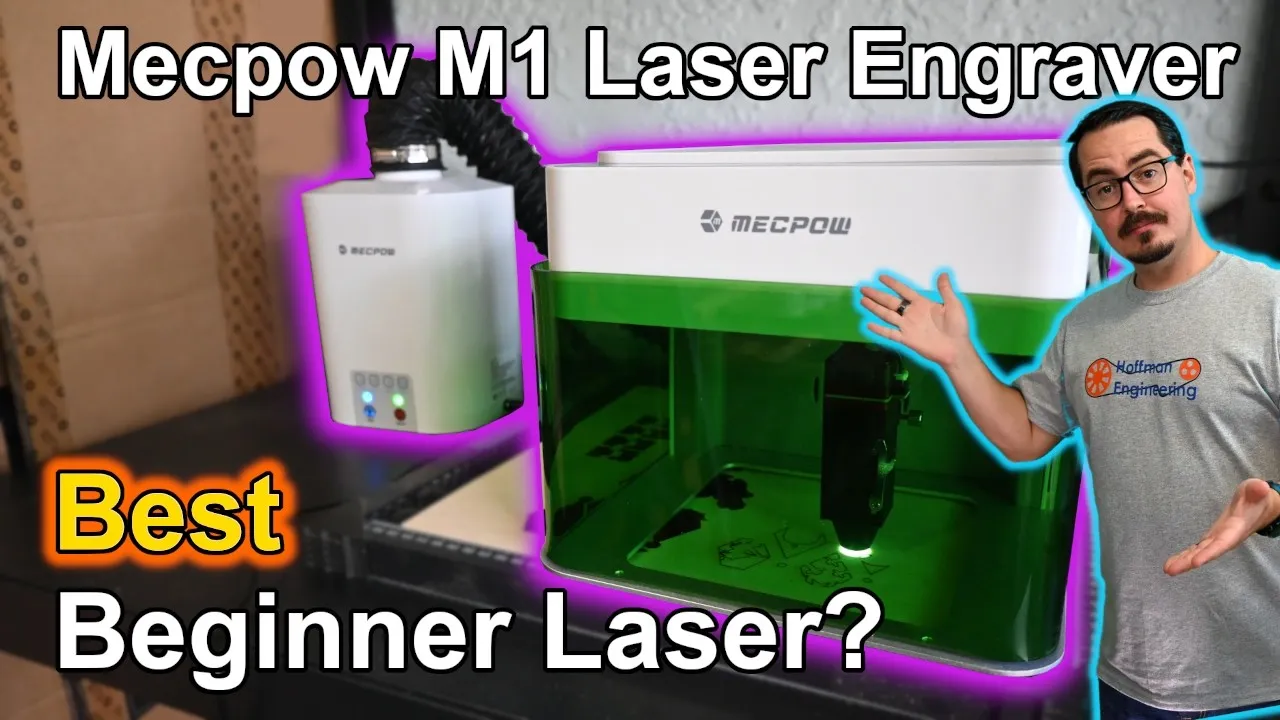
A tiny, fully enclosed FDA Class 1 diode laser for crafters, teachers and parents who want safe engraving on a desk. The 100 x 100mm work area keeps it to coasters, keychains and patches.
Check price at MecpowOn this page
Most cheap diode lasers leave the beam out in the open, so safety depends on everyone nearby doing the right thing. The Mecpow M1 goes the other way: a tiny, fully enclosed, FDA Class 1 desktop laser that starts at $179 for the 5W version. This Mecpow M1 review covers a month of testing with the 5W model and the matching P50 fume extractor, and whether a 100 x 100mm work area makes it a useful tool or a safe little toy.
Mecpow M1 Specs and the 5W Laser Module
The Mecpow M1 is a desktop diode laser engraver sold in 3.5W and 5W versions, with an optional 1.2W infrared module if you want to add metal engraving later. I tested the 5W, and that’s the one I’d recommend.
The numbers are small across the board. You get a 100 x 100mm engraving area, a rated top speed of 10,000mm/min, and a 455nm blue laser in a 2.4kg body that measures 220 x 264 x 194mm. It fits on the corner of a desk.
Mecpow doesn’t publish a spot size, but the beam is tight. My kerf test on wood came back narrow, and image engraving was sharp.
Focusing is manual. A magnetic lever arm drops down from the laser module. You lower the module until the arm touches the material, lock it, and you’re set. There’s no autofocus and no camera, but on a machine this basic the lever is quick.
Cantilever Gantry and a Day-One Fix
This is where the budget shows. The M1 uses a cantilever motion system, so the X axis hangs off a single supported Y axis instead of being held at both ends. That’s less rigid than other gantry designs. Over a 100mm work area I didn’t see vibration or other problems from it in any test.
I did hit one snag out of the box. The rubber V-slot wheels on the X and Y axes were clamped too tight from the factory, so they dragged instead of rolling. The motion stuttered and skipped steps on my first few jobs.
The fix took a few minutes. I backed off the eccentric nuts with the included wrenches, the wheels rolled freely, and the stuttering stopped. If your first engravings look shifted, check the wheels before you blame your settings.
The control board is a Makerbase MKS, a common board in the GRBL laser world. That shapes the software choices below.
Class 1 Enclosure and Safety Cutoffs
The enclosure is the reason to buy this laser. The Mecpow M1 is sold as an FDA Class 1 enclosed laser product, which means that under normal operation the hazardous beam stays behind the enclosure and its safety switches. Mecpow says the viewing window blocks 99% of the laser light.
Both cutoffs worked as advertised. Opening the lid stops the laser the instant it cracks open. A tilt sensor shuts everything down when the machine leans past about 45 degrees. On a 2.4kg machine that matters: if a cable snags and pulls the M1 off the bench, the laser turns off on the way down.
The window is tinted green, so you can watch a job without putting on safety glasses. I’d like an interior light, though. The enclosure is dim, and it’s hard to see your work mid-job.
An open-frame diode laser can damage your eyes without the right eyewear. For a home, a classroom, or a house with kids or pets, the M1 is the far safer buy. Class 1 doesn’t mean unattended, though. I had no sustained flare-ups, but lasers can ignite material, so stay in the room and keep a fire extinguisher nearby.
Work Area, Risers, and Ventilation
Inside there’s a small removable baseplate with the work area printed on it, which makes lining up a piece easy. Four riser columns stack under the machine for taller objects, up to about 11cm.
The 100 x 100mm area is the M1’s biggest limitation. Coasters and keychains fit. Anything larger doesn’t.
There is a workaround. The bottom panel comes off entirely, so you can set the M1 on top of a larger object and engrave through the open base. You can even place it over a full-size honeycomb panel. The gantry travel stays the same, but you’re no longer limited by the height and footprint of the enclosure.
For exhaust, there’s a 50mm port on the back and a hose in the box that you can route out a window. Or you can connect the P50 fume extractor.
Mecpow P50 Fume Extractor: Air Quality and Noise
The P50 is Mecpow’s entry-level fume extractor. A 50W brushless motor pulls air through a pre-filter, a HEPA filter, and activated carbon, a stack rated at 99.97% filtration.
I ran the exhaust past an air quality meter. VOC results were excellent, with readings barely moving off baseline. Particulates were mixed. My 10 micron and 2.5 micron readings climbed into the 200 microgram per cubic meter range, while 1.0 micron particles stayed lower. When I pulled the hose off the purifier, the readings pegged my sensor at once.
So the P50 clearly cuts the smoke, but it doesn’t remove every particle. It’s a good fit for a shared shop or a semi-enclosed space. I wouldn’t rely on it as the only ventilation in a closed room. If you can vent out a window too, do it.
The noise rating doesn’t hold up. Mecpow rates the P50 at under 55 dB, and I only saw that on low, at 54 dB. Medium measured 65 dB and high measured 72 dB. Airflow at the hose was 5 mph on high, 3.3 on medium, and 1.1 on low. The M1 itself reads about 59 dB from a foot away, so the P50 on high is the loudest part of the setup.
Replacement filters are cheap. A set is $30 and includes five pre-filters, the HEPA filter, and the carbon filter. Mecpow advises swapping pre-filters when they’re roughly 70% covered, the HEPA every two to three months, and the carbon every three to six months.
Controls, WiFi App, and TF Card
The whole interface is four buttons on top: Stop, Home, Frame, and Start/Pause. There’s no screen.
You can send jobs three ways: WiFi through the MKSLaser mobile app, USB from a computer, or a TF card up to 16GB using the included reader. Without a screen, card mode only runs the most recent file you loaded. You can’t browse and pick a job.
Over WiFi, the M1 broadcasts its own network and you control it from the MKSLaser app on iOS or Android. The English translation is rough in places, but every function I tried worked. One thing to set before your first job: the app doesn’t default to the M1’s 100 x 100mm bed. Enter the workspace size yourself or your framing will be off.
Software: LightBurn, LaserGRBL, or MKSLaser
Mecpow doesn’t make its own software. There’s no curated material library and no one-click workflow, so you dial in power and speed yourself. The manual documents the setup for each of the three options.
LightBurn is the one to use if you’re serious or already own a license, but it adds $80 to $100, about half the price of the laser. LaserGRBL is the free Windows option. MKSLaser runs on your phone over WiFi.
The upside is no vendor lock-in. The downside is no hand-holding. I’m a big LightBurn fan, but LaserGRBL is a fine way to start until you need LightBurn’s more advanced features.
Assembly and What’s in the Box
The M1 ships fully assembled. Take it out of the box, plug in the power adapter, focus the laser, and start a job. I was engraving within minutes.
The box also includes goggles, two wood boards, five anodized aluminum plates, a positioning plate, a marker pen, the riser columns, a card reader, a TF card, cables, and hex keys. That’s enough material to practice on the first day.
Mecpow M1 Engraving and Cutting Tests
Wood is where the M1 does its best work. The kerf test came back at 0.4mm, and that tight beam made photos and detailed grayscale work come out sharp and clean. For cutting, my standard 3mm plywood test went through in a single pass at 280mm/min, a solid result for a 5W laser.
Anodized aluminum cards mark well. The laser burns off the coating to show the metal underneath. It isn’t fast, but the results are clean.
Leather engraved crisply with even darkening. The work area is the limit again. A leather patch fits. A wrap bracelet or a belt doesn’t.
Black acrylic at 3mm cut cleanly in two passes at 200mm/min. A blue diode can’t directly cut clear acrylic, so stick to dark colors. And never cut vinyl or PVC. It releases toxic fumes that will ruin the filter and hurt your lungs.
Slate is still one of my favorite materials to engrave, and the slate coasters turned out great.
Verdict: Should You Buy the Mecpow M1?
The Mecpow M1 is what it claims to be: a tiny, safe, beginner-friendly laser engraver at a low price. The FDA Class 1 enclosure and the safety cutoffs all worked, and the whole machine can sit on a small workbench and be put away when you’re done. Once I corrected the wheel tension on day one, it ran for the rest of the month with no failed jobs and no crashes.
The tradeoffs are clear too. The 100mm work area keeps you to coasters and keychains unless you remove the base. The cantilever gantry is less rigid than other designs. And with no first-party software, there are no preset material settings to lean on.
At the time of the review, the M1 5W was $179 on its own and $259 bundled with the P50 fume extractor. The P50 sells separately for $99, so the bundle only adds $80 for it. That’s a good deal if you were going to buy an extractor anyway. The 3.5W version is about $20 cheaper, but I’d pick the 5W.
The M1 competes on price and footprint, not capability. If you’re a crafter, a teacher, a parent buying a first laser for a safety-minded teen, or a hobbyist who wants a small dedicated machine for gifts, it’s an easy recommendation. If you need a larger bed, polished beginner software, or plan to cut anything bigger than a coaster, save up for Mecpow’s X-series lasers instead.
Check the latest price on the Mecpow M1 and use code HEM1 at checkout for the latest discount.
Pros and cons
✓ Pros
- FDA Class 1 enclosure. The lid interlock and the tilt sensor both worked as advertised
- Ships fully assembled and was engraving within minutes
- Tight beam with a 0.4mm kerf, so photo and grayscale engraving comes out sharp
- Cut 3mm plywood in a single pass at 280mm/min
- The bottom panel comes off, so you can set the machine on larger material
- Small 2.4kg body that fits on the corner of a desk and stores away
- Quiet, about 59 dB from a foot away
- P50 replacement filter set is $30
✗ Cons
- 100 x 100mm work area limits you to coasters, keychains and patches
- Wheels were too tight from the factory and caused skipped steps until I adjusted the eccentric nuts
- No first-party software and no preset material library
- Cantilever gantry is less rigid than other gantry designs
- No interior light, so the enclosure is dim during a job
- No screen. TF card mode only runs the most recent file
- P50 fume extractor measured 72 dB on high, well over the under 55 dB rating
- P50 reduces particulates but doesn't remove them all, so you still need ventilation
Specs
| Laser Power | 5W blue diode (a 3.5W version is also sold) |
|---|---|
| Wavelength | 455nm |
| Work Area | 100 x 100mm |
| Kerf (tested) | 0.4mm on wood. Mecpow doesn't publish a spot size |
| Rated Max Speed | 10,000mm/min |
| Max Object Height | About 11cm with the riser columns |
| Safety | FDA Class 1 enclosure, lid interlock, tilt sensor |
| Exhaust | 50mm port, hose included |
| Machine Dimensions | 220 x 264 x 194mm |
| Weight | 2.4kg |
| Software | LightBurn, LaserGRBL, MKSLaser app (no first-party software) |
| Connectivity | WiFi, USB, TF card up to 16GB |
Where to buy
Use code HEM1 for the latest discount at Mecpow. Prices may have changed since this review.
FAQ
Is the Mecpow M1 worth it?
If you want enclosed, Class 1 engraving on a desk for under $300 with a fume extractor, the M1 is the cheapest way I've found to get there. It suits crafters, teachers, and parents buying a first laser. If you need a larger bed or polished beginner software, save up for a bigger machine.
Do you need safety glasses with the Mecpow M1?
The M1 is sold as an FDA Class 1 enclosed laser product, so under normal operation the beam stays behind the enclosure and its safety switches. The green-tinted window lets you watch a job without safety glasses. Opening the lid stops the laser, and a tilt sensor shuts it down if the machine leans past about 45 degrees.
What materials can the Mecpow M1 cut and engrave?
In my testing it cut 3mm plywood in one pass at 280mm/min and 3mm black acrylic in two passes at 200mm/min. It also engraved wood, leather, slate, and anodized aluminum cleanly. Like other blue diode lasers, it can't directly cut clear acrylic, and you should never cut vinyl or PVC.
Does the Mecpow M1 work with LightBurn?
Yes. Mecpow doesn't make its own software, so your choices are LightBurn, the free LaserGRBL on Windows, or the MKSLaser phone app over WiFi. LightBurn costs another $80 to $100, so LaserGRBL is a fine place to start.
Is the Mecpow P50 fume extractor enough for indoor use?
It scrubbed almost all the VOCs my meter could read, but particulate readings still climbed into the 200 microgram per cubic meter range. I'd treat it as a comfort improvement for a shared shop or semi-enclosed space, not a substitute for ventilation. If you can also vent out a window, do it.
This Mecpow M1 and P50 fume extractor were provided by Mecpow for review. This post contains affiliate links. If you purchase through them, I may earn a small commission at no extra cost to you. All opinions are my own.
See how the Mecpow M1 5W compares to the other lasers I've tested