VEVOR 34 Inch Vinyl Cutter First Impressions After a Month
Early impressions after about a month are very positive. It set up easily, cut clean multi-color stickers with the bundled vinyl, and comes with a lifetime SignMaster license, so it suits a home crafter or small sign shop that wants a wide cutter without a subscription.
Check price at VEVOROn this page
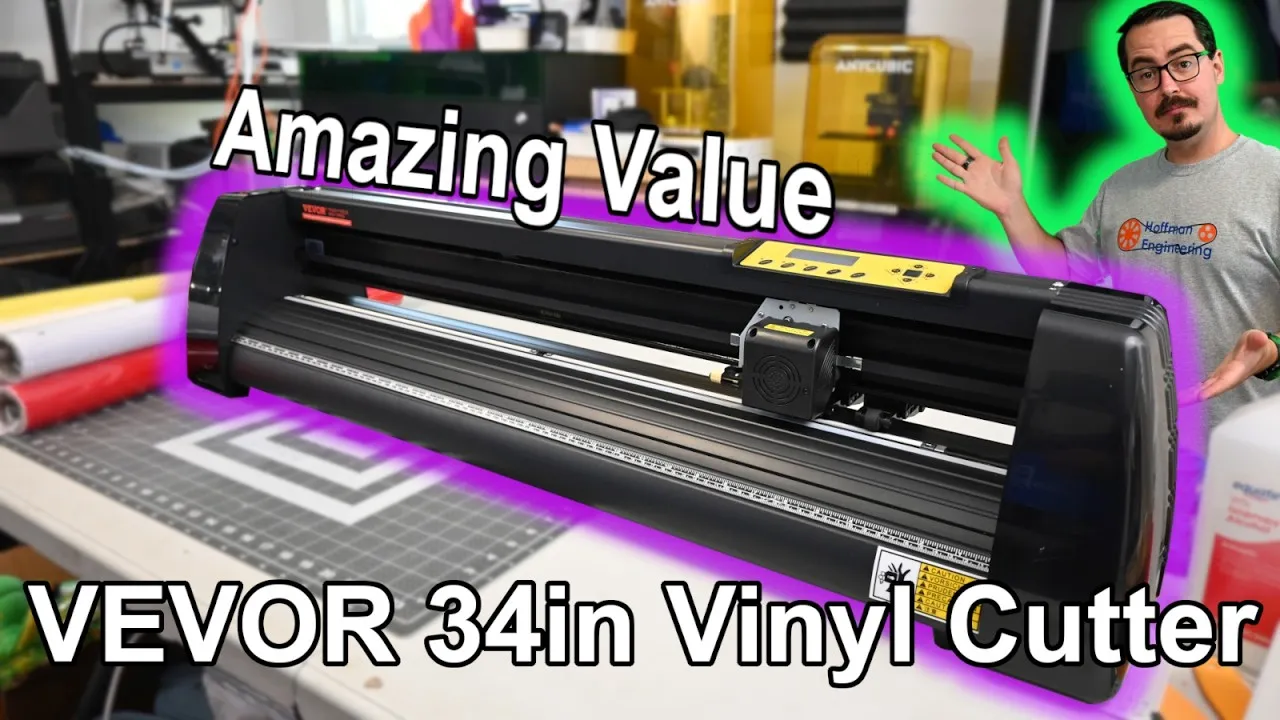
Can a budget vinyl cutter handle multi-color stickers and big sign work? These are my first impressions of the VEVOR 34 inch vinyl cutter bundle after about a month of use, from assembling the stand to cutting and stacking a four-color logo sticker. You’ll see how the hardware, the bundled vinyl and the SignMaster software held up, and who this wide cutter makes sense for.
VEVOR 34 Inch Vinyl Cutter Hardware and Specs
This is the VEVOR KW-870D, a 34 inch vinyl cutter and plotter. It takes rolls up to 34.3 inches (870mm) wide and cuts up to 30.7 inches (780mm) across. Rubber feet let it sit on a bench, or you can set it on the included aluminum stand, which rolls on casters and carries two roll holders and a fabric basket to catch cut material.
The cutting head raises and lowers the blade, and blade force adjusts from 10 to 500 grams. VEVOR also includes a ball-point pen holder, which turns the machine into a plotter. Plotting a few designs first was a good way to learn how it moves.
There’s no laser pointer for alignment like on higher-end cutters. You use the blade tip as your origin point instead.
Two knurled aluminum rollers feed the material, with three dual-spring pinch rollers you can slide anywhere along the bar. I had no slipping or lost position, and with the tension set right they left very little marking on the vinyl. On the left side you’ll find the power switch and fuse, and on the right a USB port and a serial port. I did all my testing over USB.
Blades, Control Panel and Cut Settings
The bundle comes with three blades. The blade holder adjusts the blade depth, and a spring-loaded pin pushes the blade out far enough to grab it safely when you swap it. The manual suggests replacing blades every six months, sooner with heavy use or abrasive material like glitter vinyl.
The LCD control panel on top uses simple menus to jog the head, reset the origin, and set speed and force. Speed runs from 10 to 800mm/s. The manual’s suggested starting point is 100 grams at 300mm/s.
The most useful button is Test. It cuts a small square so you can check your settings before committing a whole design. A couple of test cuts was all it took to dial in each material.
What’s in the Vinyl Cutter Bundle
The bundle is what makes this a ready-to-go kit. You get five rolls of colored vinyl, each 24 inches wide and 10 feet long, plus a roll of transfer tape, a roll of masking tape and a roll of magnetic backing. Tools include a tack mat, a hobby knife and a squeegee.
The included vinyl is a little thin, but it was easy to work with. It cut well at 80 grams and 300mm/s.
If you already have your own supplies, VEVOR also sells the cutter without the vinyl, transfer tape and magnets. At recording that version was $23 cheaper than the bundle.
Assembling the Stand
The cutter itself comes ready to go. Only the stand needs assembly, and it’s a few bolts and screws holding extruded aluminum parts together. VEVOR packs a number of extra screws, which threw me off at first. Once I realized the spares were intentional, the rest went together without trouble. Then you set the cutter on top.
SignMaster Software
The bundle includes a basic license for SignMaster v5 Cut. It looks dated at first, but there’s a lot in it. You get tools for drawing shapes, working with text and adding effects, and it imports designs from almost any other design program.
A contour cut wizard lets you print a design, load the print back into the cutter and cut around the outline. There are calibration tools for dialing in the machine, and the video tutorials and manual were a big help while I learned it.
The license is lifetime. You won’t pay a monthly subscription to keep using your cutter, which isn’t the case with some other brands.
Cutting Vinyl Stickers: 3D Print Log Logo
For a first project I imported the SVG of my 3D Print Log logo and set it to white. Since the canvas is also white, I switched to wireframe view to see it. The file had a few extra lines, so I used Weld to merge them.
I loaded the white vinyl, used the Test button to land on 80 grams of force, and hit cut. SignMaster’s speed-weed feature made weeding easy. The logo has a few very small bubbles, and a couple of them pulled away during weeding, but otherwise it came out great. That’s the main limit with any vinyl cutter: the tiniest cutouts have to survive weeding.
Multi-Color Vinyl Sticker: Hoffman Engineering Logo
Next was a four-color sticker of the Hoffman Engineering logo: blue text, a black belt and orange gears. I used the Contour tool to add a white outline as the sticker’s base, and it was about as easy as it gets.
When sending to the cutter, the Separate by color option splits the job into its four colors. You can add registration marks, but I aligned the layers by hand. I cut one color, loaded the next, and repeated until all four were done.
Weeding took a few minutes, and this time nothing pulled away. Then I used transfer film to stack the layers one at a time into the finished sticker.
Once you get into a rhythm, designs go fast. I also cut a sheet of logos for my friend Bearstow’s Barnstormers Modelling, who builds model airplanes. SignMaster made it easy to duplicate and scale the logo, and the cutter handled them cleanly.
Applying the Stickers
The hardest part was choosing where to put them. The FLSUN S1 Pro 3D printer had some open space, so that’s where they went. The included transfer tape held well enough to peel the stickers off their backing, then released easily once they were on.
Verdict: Should You Buy the VEVOR 34 Inch Vinyl Cutter?
These are early impressions after about a month, not a long-term durability test, but they’re very good ones. The stand went together easily, the defaults were a solid starting point, and a few test cuts got me clean results, even on fairly small text. The bundled vinyl, transfer tape and magnetic backing cover your first projects, and the lifetime SignMaster license saves you a subscription. I couldn’t verify VEVOR’s 0.01mm precision claim, and you’ll miss a laser pointer if you’re used to one.
It makes the most sense if you want a wide cutter for stickers now and room to grow into signs, car magnets, labels or heat-press shirts later. I only scratched the surface of what the 780mm cutting width can do.
Price is the part that has changed. At recording, the bundle was $281.99 after registering a VEVOR account, which made it one of the least expensive 34 inch cutters on the market. VEVOR’s product page now lists it at $363.90, and some bundle options showed as out of stock when I checked, so confirm the current price and stock before ordering. Code VTOPUS takes 8% off.
Check the latest price at VEVOR
Pros and cons
✓ Pros
- Wide 870mm feed and 780mm cut width opens up signs, car magnets and banners
- Bundle includes 5 rolls of vinyl, transfer tape, masking tape, magnetic backing and weeding tools
- Lifetime SignMaster license with no monthly subscription
- Test button and default settings made dialing in speed and force quick
- Pinch rollers held the vinyl without slipping and left very little marking
- Stand assembly was straightforward, a few bolts into extruded aluminum
- SignMaster's contour tool and separate-by-color option make multi-color stickers easy
- Included pen holder lets you plot designs to learn the machine
✗ Cons
- No laser pointer for alignment, so you set the origin with the blade tip
- SignMaster looks dated at first glance
- Included vinyl is a little on the thin side
- Extra screws in the stand hardware were confusing at first
- Tiny cutouts can pull away while weeding, as with any vinyl cutter
- The 0.01mm precision claim could not be verified
- Price has gone up since recording ($281.99 then)
Specs
| Max Media Width | 34.3 in (870mm) |
|---|---|
| Max Cutting Width | 30.7 in (780mm) |
| Blade Force | 10 to 500g (bundled vinyl cut well at 80g) |
| Cut Speed | 10 to 800mm/s (300mm/s used in testing) |
| Rated Precision | 0.01mm (advertised, not verified) |
| Alignment | Blade tip as origin, no laser pointer |
| Pinch Rollers | 3 adjustable, dual-spring |
| Included Blades | 3, plus a ball-point pen holder for plotting |
| Connectivity | USB and serial |
| Software | SignMaster v5 Cut basic, lifetime license |
Where to buy
- VEVOR 34 Inch Vinyl Cutter Bundle with SignMaster$363.90 →
Use code VTOPUS for 8% off at VEVOR. Prices may have changed since this review.
FAQ
Is the VEVOR 34 inch vinyl cutter worth it?
After about a month of use, it made clean single-color and four-color stickers with the bundled vinyl, and the lifetime SignMaster license means no subscription. At recording the bundle was $281.99, one of the least expensive 34 inch cutters available. It has gone up since, so compare the current price before you buy.
What can you make with the VEVOR 34 inch vinyl cutter?
Stickers and decals in one or several colors are the obvious start, and the bundle includes magnetic backing for magnets. The 780mm cutting width also makes larger work possible, like signs, car magnetics, labels and heat-transfer designs for t-shirts, with the right materials loaded.
What software comes with the VEVOR vinyl cutter?
The bundle includes a basic lifetime license for SignMaster v5 Cut. It has drawing and text tools, imports designs from other programs, and includes a contour cut wizard, color separation, weeding helpers and calibration tools, plus video tutorials and a manual.
Does the VEVOR 34 inch vinyl cutter have laser alignment?
No. There is no laser pointer, so you jog the cutting head and use the blade tip as the origin point. It worked fine for manually aligning a four-color sticker, and SignMaster can add registration marks if you need them.
This VEVOR 34 inch vinyl cutter was provided by VEVOR for review. This post contains affiliate links. If you purchase through them, I may earn a small commission at no extra cost to you. All opinions are my own.